
ConnectedTV Device ID List
Details the CTV device ID block list, how CTV signals are baselined separately from mobile, and its schema, probabilities and best practices.
The CTV device ID blocklist provides additional defense mechanisms that are specifically optimized for CTV inventory. In order to achieve that, there is a need for various optimizations in the way the CTV signals from various sources are analyzed. For example, since CTV still generate lower volumes than regular mobile traffic, special segmentation is required in order to create CTV baselines for an CTV deviceID block list inclusion. Similarly, the time horizon that the CTV signals appear as well as the statistical significance thresholds used are optimized to fit this use-case better.
CTV Device ID Block List Details
Update Interval: Twice per day (estimated availability 8:00 AM and 8:00 PM UTC)
File Format: CSV
Naming convention in FTP folder: OttDeviceIdBlocklist_YYYYMMDD.csv
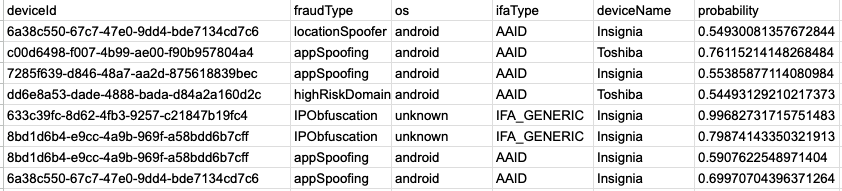
Schema: deviceId | fraudType | os | ifaType | deviceName | probability
Example:
CTV Device ID Block List Best Practices
Below is a list of best practices specific to implementing the Device ID block list. Please see Blocking for general best practices that apply to all lists.
Probabilities
- Pixalate purposely classifies the CTV Device ID Block List with probabilities allowing the client to set their own thresholds based on the quality and scale of their supply inventory. In order for an entry to be included on a block list, it should be associated with a probability of at least 0.5 (as it is calculated by Pixalate’s proprietary machine learning algorithm). However, the determination of threshold is held by the client.
As a generic guideline, Pixalate recommends the following thresholds:
- Probability equal to 1, for filtering out only the worst offender for blocking (deterministic).
- Probability greater than or equal to 0.90 for filtering out users that are fraudulent beyond reasonable doubt.
- Probability between 0.75 (inclusive) and 0.90 (exclusive), to filter out users that are associated with clear and convincing evidence that they are fraudulent.
- Probability between 0.5 (inclusive) and 0.75 (exclusive), to filter out users that it is more likely than not that they are fraudulent (also known as preponderance of the evidence standard).
- When making adjustments to the probability threshold, Pixalate highly recommends regular checks-and-balances against impression delivery as lowering the probabilistic threshold can potentially impact the impression count.
Implementing New Files
- Check once every hour
- Download only when a new file is available
- Continue hourly checks even after downloading, as multiple files may occasionally be uploaded
- Do not use the file name to determine the latest file.
- The CSV files do not include a time or version in the file name, only a date.
- The first file available in the day (estimate: 08:00 UTC) would have yesterday's date in the file name.
- The second file available, released ~12 hrs later (estimate: 20:00 UTC) will have today's date in the file name.
- Note: The last file uploaded for today will have the same file name as the first file uploaded tomorrow and will replace it.
- Use the header information to determine the latest file
Proxy Traffic
The proxy traffic included in the CTV device ID blocklist is the one that corresponds to fake SSAI, or in general, fraudulent proxy traffic. In order to achieve that, Pixalate has implemented a proprietary framework to detect fake SSAI proxies and only the devices associated with this activity is added to the blocklist.
IVT Types
The IVT types included are all the IVT types that one can see in the Pixalate’s dashboard, except the ones that can be triggered due to integration issues such as “duplicateImpressions” and “duplicateClicks”.
The blocklist contains the following additional categorization:
NOTE: The IVT type below that is not part of the Pixalate’s existing production dashboard will be added in the near future.
| IVT Type | Definition |
|---|---|
| continuousPlay | Devices that appear to be continuously ON for the vast majority of the time of the day. |
IFA Types
The following IFA types are included as of the publish date:
| ifaType | Description |
|---|---|
| AAID | Standard Android device identifier |
| AAID_GENERIC | Generic (non-standard) Android device identifier |
| AAID_MD5 | MD5 Android device identifier |
| AAID_SHA1 | SHA1 Android device identifier |
| AFAI | Standard Amazon device identifier |
| AFAI_GENERIC | Generic (non-standard) Amazon device identifier |
| AFAI_MD5 | MD5 Amazon device identifier |
| AFAI_SHA1 | SHA1 Amazon device identifier |
| GENERIC | Generic (non-standard) device identifier that does not belong to any major vendor and that does not have standard format. |
| IDFA | Standard Apple device identifier |
| IDFA_GENERIC | Generic (non-standard) Apple device identifier |
| IDFA_MD5 | MD5 Apple device identifier |
| IDFA_SHA1 | SHA1 Apple device identifier |
| IFA_GENERIC | Generic device identifier with standard IFA format. |
| LGAID | Standard LG device identifier |
| LGAID_GENERIC | Generic (non-standard) LG device identifier |
| LGAID_SHA1 | SHA1 LG device identifier |
| MD5_GENERIC | Generic device identifier with MD5 format |
| MSAI | Standard Microsoft device identifier |
| MSAI_GENERIC | Generic (non-standard) Microsoft device identifier |
| MSAI_MD5 | MD5 Microsoft device identifier |
| MSAI_SHA1 | SHA1 Microsoft device identifier |
| RIDA | Standard Roku device identifier |
| RIDA_GENERIC | Generic (non-standard) Roku device identifier |
| RIDA_MD5 | MD5 Roku device identifier |
| RIDA_SHA1 | SHA1 Roku device identifier |
| SHA1_GENERIC | Generic device identifier with SHA1 format |
Device Names Detected
The list of major device names detected is as follows but not limited to:
Device Name
Roku
Apple
Amazon
Chromecast
Sony
LG
Microsoft
Vizio
JadooTV
Opera TV
HbbTV
Bravia
Toshiba
Insignia
Samsung
Nvidia
Updated about 2 months ago