
How to use Pixalate’s MFA Data feeds to block MFA traffic
Covers Pixalate's three MFA data feeds for websites, mobile apps and CTV apps, with their update schedule, format and naming conventions.
How can I use the MFA Data feeds to combat MFA?
Pixalate provides three data feeds to enable clients to manage their MFA risk.
- The MFA Websites/Domains data feed
- The MFA Mobile Apps Data feed
- The MFA CTV Apps Datafeed
Each data feed consists of a list of websites (or apps) along with the associated MFA Risk as described above in the methodology section.
These lists will be updated daily and will be available to download every 8am PST.
The naming convention and format of the lists are as follows
MFA Website/Domains Data feed:
Folder Name: domainmfa
File Format: CSV
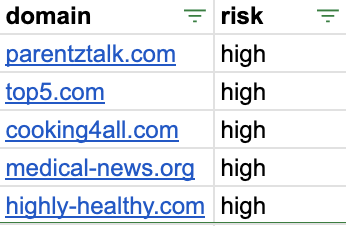
Schema: domain | risk
Naming convention in FTP folder: domainMFARisk_YYYYMMDD
More information
- Using the MRT to identify MFA traffic
If you have any further questions or feedback, please contact us via your Customer Success Manager, or by emailing us at [email protected]
Updated about 2 months ago