Clawback report
Generate a signed PDF report of the invalid traffic (IVT) in your app or domain traffic, to support clawback discussions with partners.
The Clawback Report in the Pixalate Analytics dashboard produces an official invalid traffic (IVT) report for apps or domains, as a timestamped, digitally signed PDF. Publishers, sellers and advertisers use it to document IVT and support financial clawback processes without hours of manual analysis.
The report covers only impressions that Pixalate measured.
Video (1 min): set up and generate a clawback report.
When to use it
- You need evidence of IVT for a clawback discussion with a partner.
- You want to compare app and domain traffic quality for a clawback process.
- You want to find the publishers or sellers contributing the most IVT.
- You need a PDF to share internally or with external partners.
What’s in the PDF
- IVT data: General Invalid Traffic (GIVT), Sophisticated Invalid Traffic (SIVT) and total IVT
- Report metadata: filters, date range and timestamps
- Document authentication (see Verify a report)
- Legal disclaimers and compliance statements
Report types
The metrics are fixed and can’t be customized, so every clawback report is consistent.
Generate a report
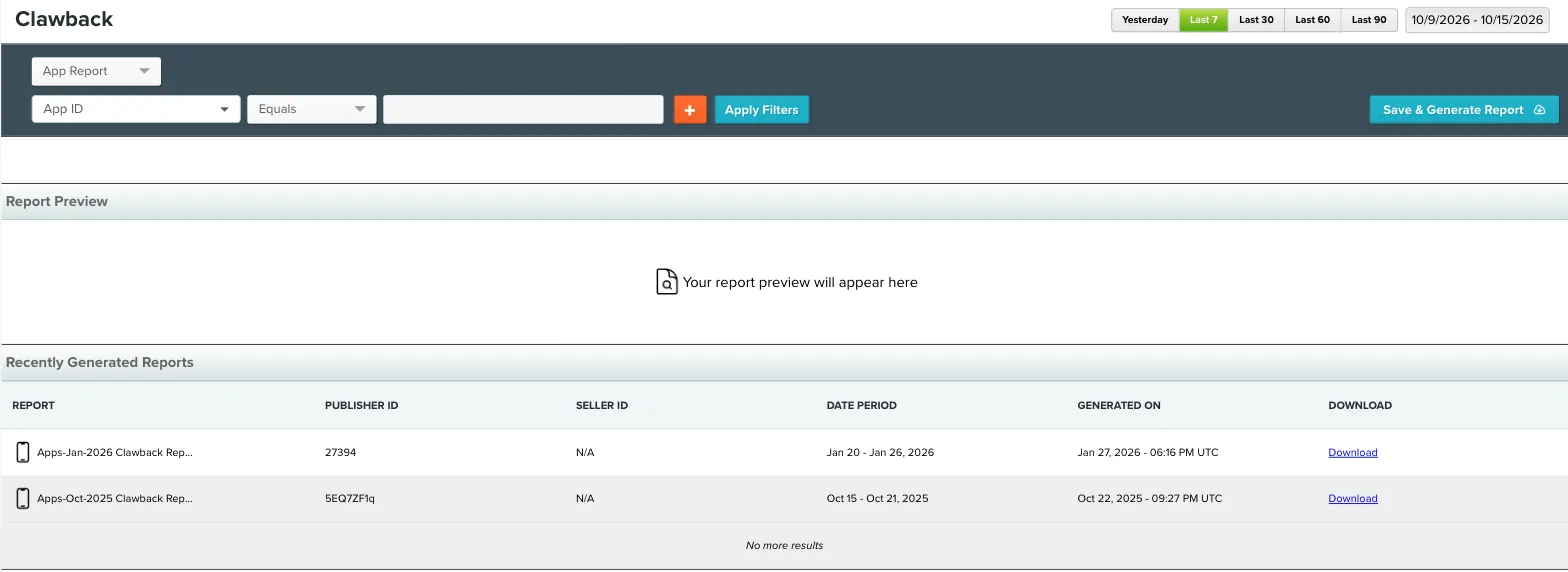
Open the Clawback Report
Sign in to the Analytics dashboard. In the left navigation, under Reports, select Clawback.
Apply filters
Select or enter the IDs to report on, such as Publisher ID and Seller ID. You can also filter by IVT Ad Count, SIVT Ad Count or GIVT Ad Count. The full list of filters for each type is in Report types.
Read the report
Executive summary
Detailed data table. Each row has:
- Identifier (App ID or Domain)
- Publisher ID
- Seller ID
- Gross Ad Counts
- IVT Ad Count and %, with SIVT Ad Count (%) and GIVT Ad Count (%)
For how Pixalate classifies IVT, see Reported IVT types and the IVT Taxonomy.
Data limits
A clawback report shows up to 500 rows by default. If you see a data limit message, filter by IVT % in the main reports screen to focus on the entities with the most IVT. If the limit still doesn’t meet your needs, contact support@pixalate.com.
Find past reports
Reports you’ve generated are in Recently Generated Reports in the Clawback section. They’re organized by date, entity type (App or Domain) and report name. You can also download reports and store them yourself. Reports are retained for up to one year.
Verify a report
Each PDF includes:
- A verification link
- A document hash (SHA-256)
- A digital signature
These make each report tamper-proof and verifiable.
FAQ
Can I store historical reports?
Yes. Download reports and store them internally. Generated reports are retained for up to one year.
Can reports be emailed automatically?
Not at the moment. Download each report manually.
How far back can a report go?
Up to one year.
Can I customize the metrics?
No. The metrics are standardized for compliance integrity.
About the terms “fraud” and “invalid traffic”
The Media Rating Council (MRC) notes that “fraud” in ad measurement isn’t fraud as defined in law; it’s a definition strictly for advertising measurement. The MRC defines invalid traffic generally as traffic that doesn’t meet certain ad serving quality or completeness criteria, or that otherwise doesn’t represent legitimate ad traffic that should be included in measurement counts. Reasons include non-human traffic (spiders, bots and similar) and activity designed to produce fraudulent traffic.
The clawback report reflects Pixalate’s opinions, based on Pixalate’s proprietary technology and analytics, which Pixalate continuously evaluates and updates. See the Disclaimer.
Questions about clawback reports? Contact support@pixalate.com.