Quota and usage
Your Media Ratings Terminal (MRT) subscription comes with a monthly quota. The same counting rules apply whether you look up apps and domains in the MRT, import a CSV file in Discovery or call the Enrichment API. This page explains how usage is counted. Your contract sets the size of your quota.
What the quota covers
Your monthly quota can be allocated across the three supply types the MRT supports:
- websites
- mobile apps
- CTV apps
The quota is shared: every debit comes out of your account’s monthly quota. No user on your account has a personal share of it.
Your subscription may also include an overage allowance, so you can keep working if you use up your monthly quota before it refreshes. Overage use is charged separately. Ask your Pixalate account manager about your allocation, any overage allowance and how it’s billed.
How usage is counted
Usage is counted in input items and output items.
So a single input item can use several units:
- one for the input item itself, and
- one for each output item returned for it.
An API response, CSV download or JSON download can contain many output items. Each one is counted separately.
An input item uses its unit when you submit it, even if no results come back for it. Output units are used only for results that are returned.
Control usage with region and device
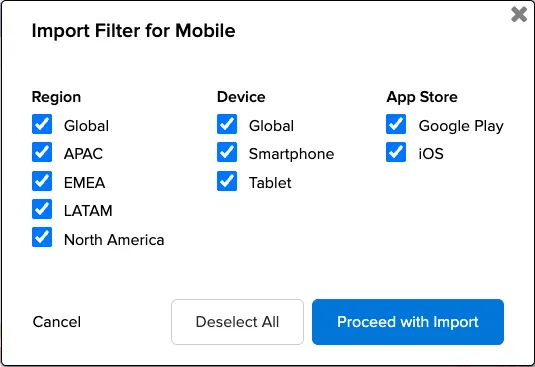
Each region and device combination returned for an input item is a separate output item. Asking for fewer combinations returns fewer results and uses less quota.
In the MRT: before you import a CSV file in Discovery, choose the Region and Device combinations you want. Setting both to GLOBAL returns one combination (one output item per store), which meets most needs.
In the Enrichment API: set the region and device parameters. Without them, a lookup returns a result for every region and device combination.
The allowed values differ by supply type. See Filter by region and device.
Check your usage in the MRT
The Quota Usage page shows how much quota you have left and a log of your usage.
Check it before a large import so you don’t run into overage.
Check your usage through the API
Call the base path for a supply type, with no app or domain, to get your quota status:
Use /mrt/ctv and /mrt/domains for the other supply types. The response includes a quota object with available, used, limit and expiry (when the quota next refreshes). For the full field list, and the equivalent calls for the Analytics Reports API and Fraud API, see Check your quota.
Keep your API key in an environment variable or secret store. Don’t print it to the terminal or to logs. See Authentication and API keys.
Related
For questions about your quota or contract, contact your Pixalate account manager. For anything else, email support@pixalate.com.