Privacy, brand safety and COPPA reports
See the privacy, brand safety and children’s privacy (COPPA) risk in the apps and websites your ads actually ran on.
Besides invalid traffic (IVT), the Pixalate Analytics dashboard can report on the privacy compliance and brand safety exposure in your ad impression traffic. These reports take Pixalate’s Media Ratings Terminal (MRT) data about websites, mobile apps and CTV apps and apply it to the impressions you measured.
Some of these reports may need a separate license. Ask your Pixalate account manager which ones your account includes.
All of them work like the other Analytics reports: set a date range, filter, add dimensions and metrics with Add Column, and save, schedule or export. See Run and customize reports.
Privacy compliance reports
These reports show potential privacy exposure in your ad traffic. Privacy information about each app or website appears as dimensions in the Compliance group of Add Column. Each report has the dimensions most relevant to its environment.
Select an app or website in the report to open its details in the MRT.
Brand safety report
The brand safety report for mobile apps shows potential brand safety exposure in your ad traffic. Brand safety information about each app appears as dimensions in the Brand Safety group of Add Column:
- Advisories Risk
- Adult Risk
- Drug Risk
- Alcohol Risk
- Hate Risk
- Offensive Risk
- Gambling Risk
- Violence Risk
Select an app in the report to open its details in the MRT.
COPPA Violation Risk report
The COPPA Violation Risk report is part of Pixalate’s COPPA compliance tools. It looks at every app that had traffic in your account and evaluates its risk using Pixalate’s COPPA assessment methodology, so you can monitor your exposure to child-directed traffic and act on it.
Highlights
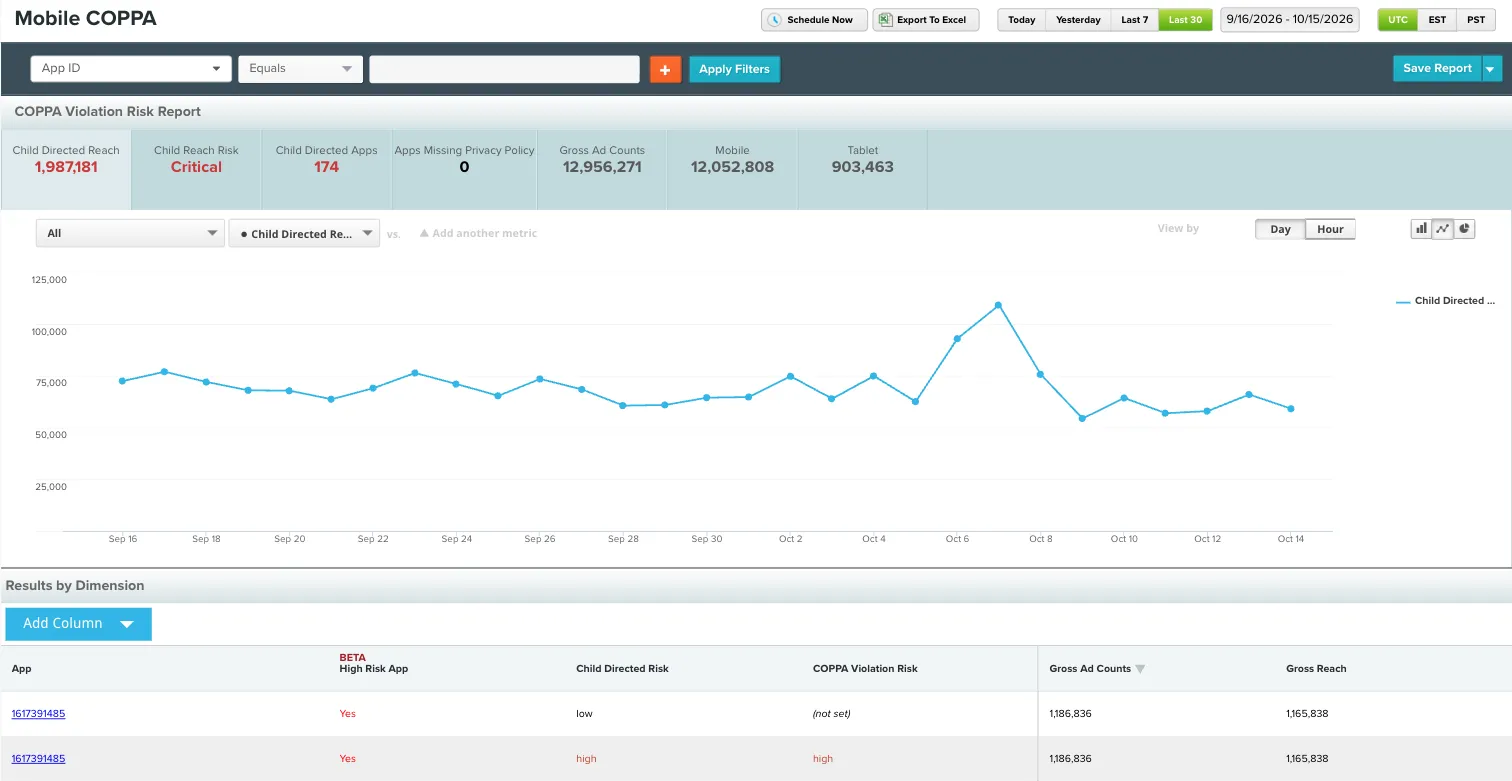
The tiles at the top summarize your exposure, alongside tiles for gross ad counts and the mobile and tablet split:
Graphs
The graphs show how these numbers change over time.
Data grid
By default, the grid lists every app grouped by two risk ratings, with Gross Ad Counts and Gross Reach as metrics:
Compliance dimensions
Select Add Column and open the Compliance group to add the data points Pixalate weighs when it rates COPPA Violation Risk. Grouping by them lets you decide which apps to work with and what to do. For example:
- Group by Child Directed and Transmits Residential IP to check whether that data reached your systems.
- Use Privacy Policy Detected to find apps to contact about adding or updating a privacy policy.
Open an app in the MRT
Select an app bundle in the grid to open that app’s page in the MRT.
COPPA compliance insights in the MRT need an MRT subscription with the COPPA widget enabled. Ask your Pixalate account manager.
For the reason codes and data fields behind these ratings, see COPPA reason codes and the COPPA data dictionary.
Related
Questions? Contact support@pixalate.com.