Skip to navigation

Dimensions

The attributes you can break Pixalate Analytics reports down by, and the values of the IPv6 Type dimension.

Dimensions are the attributes you break a report down by, such as campaign, domain or device type. Each value of a dimension gets its own row. This page defines the dimensions that are common to the standard Analytics reports. Specialized reports, such as Supply Path Optimization, compliance, brand safety and geolocation reports, have their own dimensions as well. Across all reports, Analytics offers roughly 100 dimensions and other data points.

The API name is the dimension’s name in the Analytics Reports API, where there’s a direct match. For the full API list, see Query language: Dimensions.

Ad server

DimensionDefinitionAPI name
AdvertiserThe advertiser ID associated with measured campaign ad traffic.advertiserId
CampaignThe advertising campaign ID associated with measured ad traffic.campaignId
Tag TypeThe tag integration type associated with measured Analytics traffic.
Ad PlatformThe third-party ad network the traffic came through, which lets advertisers publish text, graphic or animated ads on the web.
Ad SizeThe size of the placement, in pixels.adSize
Line ItemThe line item. You set and pass it at your discretion, to report on a discrete level.lineItemId
SiteThe site ID associated with measured campaign ad traffic.siteId
PublisherThe publisher ID associated with measured campaign ad traffic.publisherId
CreativeThe creative ID associated with the measured ad creative.
SellerThe seller ID associated with ad traffic, set and passed by each client.kv7
Traffic SourceThe search engine or referring domain that sent traffic to your site. For example, google (search engine) or google.com (domain). Traffic that doesn’t come from search results or a referring link is shown as (direct).adTrafficSource
Site PlacementThe site placement ID associated with ad traffic, set and passed by each client.
Supply TypeThe type of inventory or supply, such as desktop display, mobile web video, mobile app video or OTT video, set and passed at creative or placement level. For the values you can pass, see The Pixalate tag and macros.kv24
Fraud TypeThe invalid traffic (IVT) type. Fraud types are calculated based on the worst fraudulent activity that each IP has performed globally, so a report can show click fraud even if you haven’t implemented Pixalate click trackers. See Reported IVT types.fraudType
Creative TypeThe type of ad creative measured, such as display or video.
Video Play StatusThe video player configuration, such as auto-play, click-to-play or continuous play, set and passed at creative or video player level.kv44
IPv6 TypeThe type of IPv6 address associated with measured ad traffic. See IPv6 types.ipv6Type

User location

DimensionDefinitionAPI name
CityThe city associated with measured ad traffic, at user level.city
Country NameThe country associated with measured ad traffic, at user level.countryName
Country CodeThe code of the country associated with measured ad traffic.countryCode
Postal CodeThe postal code (ZIP code) associated with measured ad traffic.postalCode
Region CodeThe code of the region within a country associated with measured ad traffic.regionCode
DMAThe designated market area associated with measured ad traffic, at user level.dma

Device

DimensionDefinitionAPI name
Device Brand NameThe manufacturer or brand name of the device.deviceBrandName
Device Marketing NameThe name of the device model.deviceMarketingName
Device Model IDThe model ID of the device.deviceModelId
Device TypeThe type of device used to interact with the site.deviceType
Operating SystemThe user’s operating system where the ad was served.os
BrowserThe user’s web browser.browserName
Device Traffic TypeThe traffic breakdown by app or web for each device type.deviceTrafficType
App IDThe identifier of the measured app.

Publisher

DimensionDefinitionAPI name
Auto RefreshShows whether site or app, or publisher or developer, automatic-refresh configurations are present. Based on identifiers you pass, so that this traffic can be reported separately in a manner consistent with the applicable MRC/IAB Guidelines.
Sourced TrafficTraffic purchased or acquired as part of routine supply chain transactions. Based on identifiers you pass, so that this traffic can be reported separately in a manner consistent with the MRC IVT Guidelines.
URLThe address of the web page or file.
DomainThe core part of a website’s URL. For example, in www.example.com/news, the domain is example.com.
True DomainThe actual domain the impression was served on, however many iframes it was nested in. Pixalate detects it with proprietary technology. It’s available for 75 to 85% of all impressions.
High Risk AppA Yes/No flag in app-specific reports that shows whether an app is on a High Risk Apps 2.0 list. See High Risk App.isHighRiskApp

User

DimensionDefinitionAPI name
SegmentThe user segment ID associated with ad traffic, set and passed by each client.segment
User IDA unique string that identifies a user.kv3
OrganizationThe organization associated with the IP address.organization

Time

DimensionDefinitionAPI name
DayThe date the ad was served (YYYY-MM-DD in the API).day

High Risk App

High Risk App (Yes/No) is a flag in app-specific reports. It shows whether an app appears on the High Risk Mobile Apps 2.0 or High Risk CTV Apps 2.0 list.

Impressions from listed apps aren’t classified as invalid traffic only because the app is listed. Use this flag, together with the Traffic from High Risk Apps (%) metric, to see how much of your traffic comes from listed apps and decide what to block.

  • Exporting the flag through Analytics reports or the Analytics Reports API requires a High Risk Apps 2.0 Enterprise subscription. See High Risk Mobile Apps 2.0 and High Risk CTV Apps 2.0.
  • In the API, isHighRiskApp may not be enabled for your account by default. Contact your Pixalate account manager to have it enabled.

IPv6 types
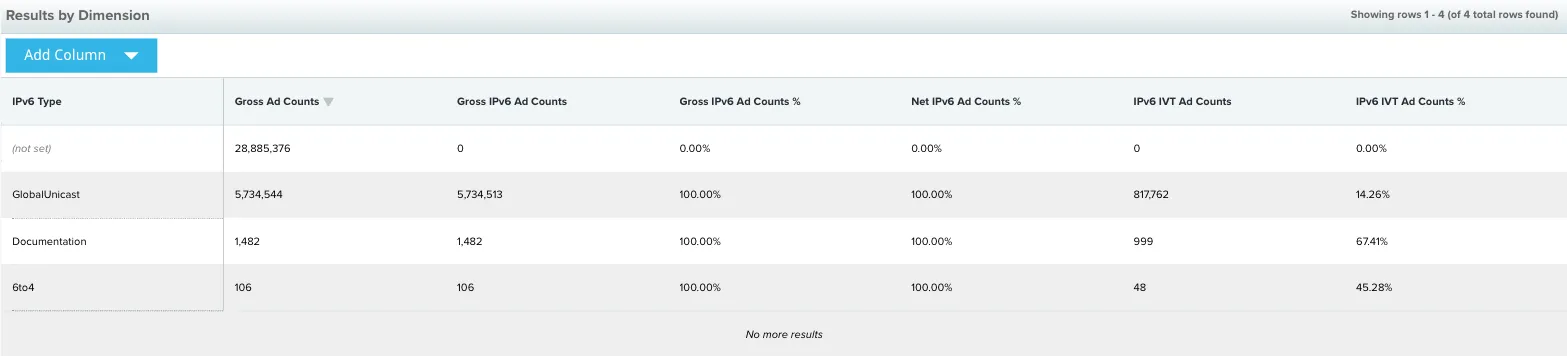
IPv6 Type report
The IPv6 Type report breaks traffic down by IPv6 address type.

The IPv6 Type dimension groups IPv6 traffic by address type. The table describes the IPv6 address types, with the IPv4 equivalent where there is one.

PrefixTypeWhat it meansIPv4 equivalent
::/128UnspecifiedUsed only as a source address by a host that is starting up, before it has learned its own address.0.0.0.0
::1/128LoopbackUsed when a host talks to itself over IPv6, for example when one program sends data to another.127.0.0.1
::ffff:0:0/96
Example: ::ffff:192.0.2.47
IPv4-mappedEmbeds an IPv4 address in an IPv6 address, for example in a dual-stack transition. See RFC 4038.None. Look up the mapped IPv4 address in the relevant Regional Internet Registry (RIR) WHOIS database.
fc00::/7
Example: fdf8:f53b:82e4::53
Unique local addresses (ULAs)Reserved for local use in home and enterprise networks; not public address space. They may not be unique, aren’t registered, and aren’t meant to be routed on the public internet. See RFC 4193.Private address space (RFC 1918): 10.0.0.0/8, 172.16.0.0/12, 192.168.0.0/16
fe80::/10
Example: fe80::200:5aee:feaa:20a2
Link-localUsed on a single link or non-routed network, such as an Ethernet LAN. They don’t need to be unique outside that link, and routers must not forward packets with a link-local source or destination.169.254.0.0/16
2001:0000::/32TeredoTunnels IPv6 through IPv4 NATs. The address contains the Teredo server’s IPv4 address, NAT flags, and the obfuscated client port and IPv4 address. You can reverse it to find the relay server’s IPv4 address and look it up in the relevant RIR WHOIS database.None
2001:0002::/48
Example: 2001:2::430
BenchmarkingReserved for benchmarking network devices (RFC 5180). Not used as a source or destination on the public internet.198.18.0.0/15
2001:20::/28ORCHIDv2Overlay routable cryptographic hash identifiers (RFC 7343). Visible only end to end; routers shouldn’t see them as a source or destination. Replaces the deprecated ORCHID prefix 2001:10::/28.None
2002::/16
Example: 2002:c000:201::1
6to4A 6to4 gateway adds its IPv4 address to 2002::/16 to create a unique /48 prefix. You can reverse it to find the gateway’s IPv4 address (the example embeds 192.0.2.1) and look it up in the relevant RIR WHOIS database.None. The 6to4 relay anycast prefix 192.88.99.0/24 is deprecated (RFC 7526).
2001:db8::/32
Example: 2001:db8:8:4::2
DocumentationUsed in examples and documentation. Never a source or destination address.192.0.2.0/24, 198.51.100.0/24, 203.0.113.0/24
2000::/3Global unicastGlobally unique, routable addresses used by individual devices. Find the network operator through the WHOIS servers of the RIRs in the IANA IPv6 unicast address assignments registry.No single equivalent block
ff00::/8
Example: ff01::2
MulticastIdentifies multicast groups. Used only as a destination address, never as a source.224.0.0.0/4

For all special-purpose IPv6 ranges, see the IANA IPv6 Special-Purpose Address Registry.

Questions? Contact support@pixalate.com.