Skip to navigation

Discovery

Filter millions of mobile apps, CTV apps and websites by risk, brand safety, compliance and traffic signals, and export the results.

Discovery is the Media Ratings Terminal (MRT) workspace for vetting supply at scale. It gives you a filtered, searchable view of millions of mobile apps, CTV apps and websites, with privacy, compliance, risk, traffic and brand safety signals in one place. Use it to build an exclusion list before a campaign, vet a new publisher, or check a list of your existing supply.

To open it, sign in at ratings.pixalate.com and select Discovery.

Video (1.5 min): find and filter supply in Discovery, then export the list.

Choose a channel

Discovery controls
Discovery's channel, store, device and region controls.

Discovery has three workspaces. They share the same filters and export workflow, so you can apply the same vetting standards to each.

ChannelCovers
Mobile AppsiOS (App Store) and Android (Google Play) apps.
CTV AppsStreaming apps on major CTV platforms, such as Roku, Fire TV, Samsung and tvOS. CTV apps have some data points mobile apps don’t, including app spoofing signals and channel data for MVPD apps.
WebsitesOpen web domains, with signals for desktop and mobile web traffic, including ads.txt status, MFA risk, brand safety and domain age.

Set device and region

Discovery reports data separately for each device type and region. If you leave these broad, you get several rows for the same app or domain, one for each device and region combination, plus one for all data. To get one row per app or domain, choose a single device option and a single region.

Device

ChannelOptions
Mobile appsAll Devices, Smartphone (phones such as iPhone, Samsung Galaxy or Google Pixel) or Tablet (such as iPad or Samsung Galaxy Tab).
WebsitesAll Devices, Desktop (devices running desktop operating systems such as Windows, macOS and Linux) or Mobile (devices running mobile operating systems such as iOS and Android). The Primary Device filter (Desktop, Mobile or Video) narrows the list to sites by their main traffic type.
CTV appsThe CTV platform the app runs on.

All Devices reports all of Pixalate’s data for the app or domain in one row, whatever device it was seen on. For websites, All Devices also includes data that the other options leave out, such as CTV traffic and traffic from unknown devices.

For websites, an Include Subdomains toggle next to the region menu (off by default) includes subdomains in the results.

Region

The region options, for apps and websites, are:

RegionCovers
North AmericaThe United States and Canada. Mexico is in LATAM.
EMEAEurope, the Middle East and Africa.
LATAMLatin America, including Mexico and the countries of Central and South America.
APACAsia Pacific.
GLOBALAll of Pixalate’s data for the app, whatever country or region it came from.

Websites use the same five regions as apps: GLOBAL, APAC, EMEA, LATAM and North America. Choose GLOBAL to cover all regions.

Which settings to choose
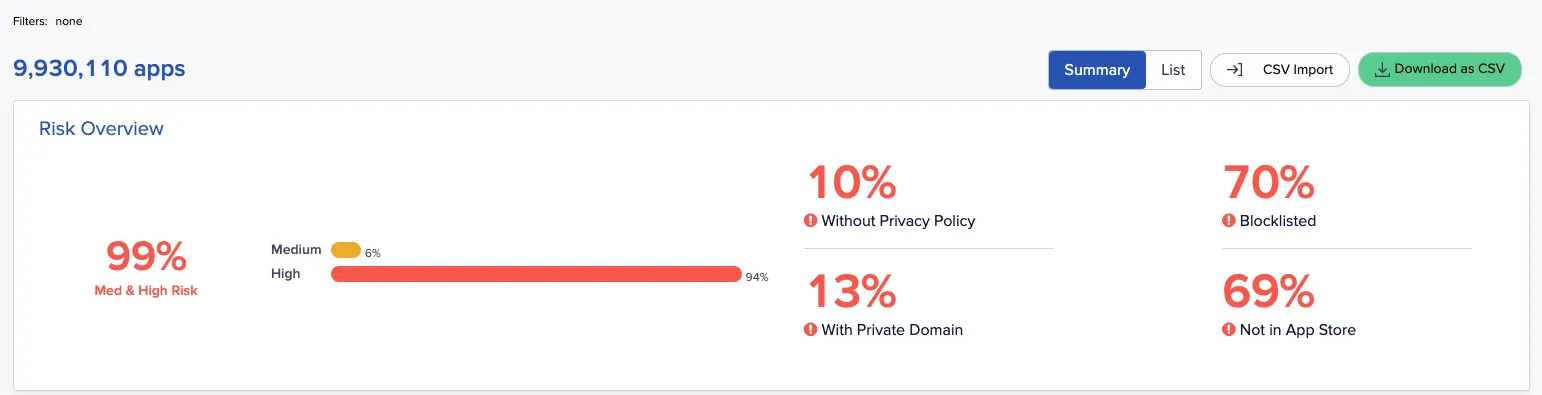
Discovery summary
The Discovery summary for the current filters, with CSV Import and Download as CSV.

Match the settings to your media buy. If your partners may deliver only to smartphones, or only in certain regions, those settings represent your buy most closely. Many buys don’t restrict device or location, and inventory providers can misrepresent devices, so All Devices and the GLOBAL region give the most complete view of risk.

When you upload a list, each device and region combination returned is a separate result, and results count toward your quota. Choosing All and GLOBAL keeps the number of results down. See Quota and usage.

Filter the results
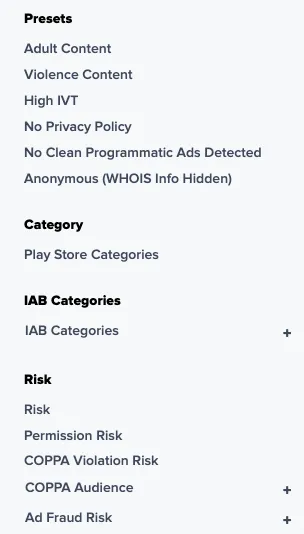
Discovery filters
Some of the Discovery filters for mobile apps: presets, categories and risk.

The filter panel on the left is where most vetting happens. You can filter on hundreds of metrics, grouped into these categories:

  • Risk and IVT. The overall risk rating (Low, Medium or High) is a composite score based on programmatic transaction data, invalid traffic (IVT) rates, ad viewability, registration data, app store data, authorized sellers, brand safety information and more. Filter on the composite rating or on individual IVT signals.
  • Brand safety. Separate filters for each advisory category: adult content, gambling, violence, offensive content, hate speech, and alcohol or drug content. Use them to match a specific advertiser’s requirements rather than one blanket threshold.
  • Compliance. COPPA violation risk rating, COPPA audience assessment (child-directed or general audience), privacy policy, terms and conditions, app-ads.txt or ads.txt, and age gate detection.
  • Made for advertising (MFA). A Made for Advertising (MFA) group with an MFA Risk filter (low, medium or high, one level at a time) and an MFA Risk column in the results. For websites the group also has Ad Refresh Rate, Ad Density, Social Traffic Rate and Paid Traffic Rate filters; mobile apps have MFA Risk and Ad Refresh Rate. See Find MFA sites and apps in the MRT.
  • Traffic and audience. Daily and monthly active users, inventory volume, download ranges, average user rating, content rating and top device type.
  • Supply chain. Trusted seller, app-ads.txt or ads.txt, and owner domain. For websites, Owner Domain, Family of Sites and Registrant Email are under Publisher > Publisher Details. The owner domain filter finds every property owned by one business; see Find properties by owner.

CTV spoofing toggle

For CTV apps, the Include Spoofing toggle at the top is off by default. Turning it on includes spoofed inventory, so the results list many more apps and each app’s IVT figures change. Compare the two views to see whether an app’s risk comes from its own traffic or from spoofing of its bundle ID. See App spoofing.

Upload your own list

Instead of filtering the whole index, you can upload a CSV of bundle IDs (mobile or CTV) or domains (websites). The MRT looks up each one and returns a row of data for every property it finds. You can then apply the full filter panel to your list alone, for example to check one partner’s portfolio. See Check many apps or domains at once.

Export the results

Download the filtered results as a CSV and share them with partners or load them into your own systems. To build a block or target list step by step, see Build exclusion and inclusion lists.

The export columns for each channel are listed below. For full metric definitions, see the Glossary.

#ColumnDescription
1App IdUnique identifier for the app in the Pixalate database.
2RegionRegion of the data (Global, NA, EMEA, LATAM, APAC).
3DeviceDevice type (Smartphone, Tablet, All).
4TitleApp name as listed in the app store.
5Bundle IdBundle ID (for example com.example.app).
6Track IdApple App Store numeric track ID (iOS only).
7App StoreThe app’s store (App Store or Google Play).
8CategoryApp store content category (for example Games or News).
9RiskOverall risk rating: Low, Medium or High.
10App Store Page UrlURL of the app’s store listing.
11IVT (%)Share of observed impressions classified as invalid traffic.
12Viewability (%)Share of measured ad impressions that met the viewability threshold.
13Trusted SellerThe authorized seller in app-ads.txt with the highest share of impressions.
14DownloadsApp store download range (for example 100M–500M).
15Average User RatingAverage star rating in the app store.
16Content RatingApp store age or content rating (for example Everyone or 17+).
17Developer NameName of the app developer or publisher.
18Developer EmailContact email the developer lists in the app store.
19Developer CountryDeveloper’s country as registered in the app store.
20Private DomainWhether the owner domain is registered privately (true/false).
21Terms and ConditionsWhether a terms and conditions page was detected (true/false).
22Privacy PolicyWhether a privacy policy was detected (true/false).
23Spoofing RiskRisk that the bundle ID is spoofed in open RTB (Low/Medium/High).
24Location Masking RiskRisk that location data is masked or manipulated (Low/Medium/High).
25Advertising IVT RiskRisk level of sophisticated invalid traffic (SIVT) patterns in the app’s ad traffic (Low/Medium/High).
26Click IVT RiskRisk level of invalid click activity (Low/Medium/High).
27Viewability RiskRisk level based on display viewability compared with benchmarks (Low/Medium/High).
28Daily Active UsersEstimated daily active users.
29Monthly Active UsersEstimated monthly active users.
30Top DeviceMost common device model in the app’s ad traffic.
31Top Display AdSizeMost common display ad size (for example 320x50).
32Top Video AdSizeMost common video ad size (for example 320x480).
33Display Contribution (%)Share of observed inventory that is display.
34Video Contribution (%)Share of observed inventory that is video.
35Hyper Location Availability (%)Share of bid requests that include precise location.
36Mraid VersionMRAID version detected in the app.
37Clean Programmatic Ads DetectedWhether valid programmatic ads have been observed (true/false).
38Brand Safety RiskOverall brand safety risk (Low/Medium/High).
39Content Brand Safety RatingBrand safety risk from the app’s content.
40Brand Safety Description Advisories RiskOverall advisory risk from text analysis of the store description.
41Brand Safety Description Adult Content RiskAdult content in the store description (Low/Medium/High).
42Brand Safety Description Drug Content RiskDrug-related content in the store description (Low/Medium/High).
43Brand Safety Description Alcohol Content RiskAlcohol-related content in the store description (Low/Medium/High).
44Brand Safety Description Hate Speech RiskHate speech in the store description (Low/Medium/High).
45Brand Safety Description Offensive Content RiskOffensive content in the store description (Low/Medium/High).
46Brand Safety Description Gambling Content RiskGambling-related content in the store description (Low/Medium/High).
47Brand Safety Description Violence Content RiskViolent content in the store description (Low/Medium/High).
48User Generated ContentWhether the app contains user-generated content (true/false).
49Delisted DateDate the app was removed from its app store, if it was.
50App-Ads.TxtWhether an app-ads.txt file was detected (true/false).
51IAB Primary CategoryIAB primary content category.
52IAB Sub CategoryIAB subcategory.
53COPPA Violation Risk RatingRisk of a COPPA violation based on observed signals (Low/Medium/High).
54COPPA Audience AssessmentPixalate’s audience classification: Child Directed or General Audience.
55MFA RiskMade-for-advertising risk (Low/Medium/High).
56Owner DomainBusiness domain of the app’s owner, from the app-ads.txt ownerdomain entry.
57Ad Refresh RateHow often ads refresh in the app.
58Age Gate DetectedWhether an age verification gate was detected (true/false).
59VPC DetectedWhether a verifiable parental consent check was detected (true/false).
#ColumnDescription
1DomainThe domain (for example example.com).
2RegionRegion of the data.
3DeviceDevice type (Desktop, Mobile Web, All).
4RiskOverall risk rating: Low, Medium or High.
5Ads.txtAds.txt status: Enabled, Disabled or Not Found.
6IndustryIndustry of the domain (for example News and Media).
7Site CategoryContent category within the industry (for example Blogs or Sports).
8ReachEstimated relative audience reach.
9Desktop (%)Share of observed traffic from desktop devices.
10Mobile (%)Share of observed traffic from mobile devices.
11Video (%)Share of observed ad inventory that is video.
12Family Of SitesNumber of related properties with the same owner domain.
13Bid Range Low ($)Low end of the observed CPM bid range.
14Bid Range High ($)High end of the observed CPM bid range.
15Trusted SellerThe authorized seller in ads.txt with the highest share of impressions.
16IVT RiskIVT risk level (Low/Medium/High).
17IVT (%)Share of observed impressions classified as invalid traffic.
18Click Fraud RiskRisk level of invalid click activity (Low/Medium/High).
19Viewability RiskRisk level based on viewability compared with benchmarks (Low/Medium/High).
20Viewability (%)Share of measured ad impressions that met the viewability threshold.
21Major Traffic SourceMain source of traffic to the domain (for example Search, Direct or Discovery).
22Domain Age (Years)Years since the domain was registered.
23Privacy PolicyWhether a privacy policy was detected (true/false).
24Terms and ConditionsWhether a terms and conditions page was detected (true/false).
25Private DomainWhether the domain registration is private (true/false).
26Corporate EmailWhether a corporate (not free-provider) email is associated with the domain (true/false).
27Ad Injection RiskRisk level of unauthorized ad injection (Low/Medium/High).
28Adult Content RiskRisk level of adult content (Low/Medium/High).
29Alcohol Content RiskRisk level of alcohol-related content (Low/Medium/High).
30Drug Content RiskRisk level of drug-related content (Low/Medium/High).
31Hate Speech RiskRisk level of hate speech (Low/Medium/High).
32Phishing RiskRisk level of phishing (Low/Medium/High).
33Malware RiskRisk level of malware distribution (Low/Medium/High).
34IAB Primary CategoryIAB primary content category.
35IAB Sub CategoryIAB subcategory.
36Brand Safety RiskOverall brand safety risk (Low/Medium/High).
37MFA RiskMade-for-advertising risk (Low/Medium/High).
38Owner DomainBusiness domain of the site’s owner, from the ads.txt ownerdomain entry.
39Ad Refresh RateHow often ads refresh on the domain.
40Ad DensityRatio of ad slots to content. An MFA signal for websites.
41Social Traffic RateShare of traffic from social media referrals. An MFA signal for websites.
42Paid Traffic RateShare of traffic from paid sources. An MFA signal for websites.
#ColumnDescription
1App IdUnique identifier for the CTV app in the Pixalate database.
2RegionRegion of the data (Global, NA, EMEA, LATAM, APAC).
3DeviceCTV platform the app runs on (for example Roku, Fire TV, Samsung or tvOS).
4TitleApp name as listed on the CTV platform.
5CategoryContent category (for example Entertainment or News).
6RiskOverall risk rating: Low, Medium or High.
7IVT (%)Share of observed impressions classified as invalid traffic.
8SSAI (%)Share of observed inventory delivered through server-side ad insertion (SSAI).
9Transparent SSAI (%)Share of SSAI inventory with transparent, measurable delivery signals.
10Brand Safety RiskOverall brand safety risk (Low/Medium/High).
11Trusted SellerThe authorized seller in app-ads.txt with the highest share of impressions.
12Developer NameName of the app developer or publisher.
13Developer WebsiteDeveloper’s registered website.
14Developer Total AppsNumber of CTV apps Pixalate tracks from this developer.
15App Age RiskRisk based on how recently the app was published. Newer apps can be riskier for advertisers.
16CVAA CompliantWhether the app supports the accessibility features required by the Communications and Video Accessibility Act (true/false).
17App-Ads.TxtWhether an app-ads.txt file was detected (true/false).
18Top 5 Bundle IDsThe five most common bundle IDs mapped to this app. See CTV bundle IDs.
19Include SpoofingWhether spoofed bundle ID traffic is included in the IVT figures.
20COPPA Violation Risk RatingRisk of a COPPA violation based on observed signals (Low/Medium/High).
21COPPA Audience AssessmentPixalate’s audience classification: Child Directed or General Audience.
22MFA RiskMade-for-advertising risk (Low/Medium/High).
23Owner DomainBusiness domain of the app’s owner, from the app-ads.txt ownerdomain entry.
24Ad Refresh RateHow often ads refresh in the app.

Questions? Email support@pixalate.com.