Reported IVT types
Analytics classifies each invalid impression or click under one IVT type. This page explains where those types appear in your reports and how the names in your reports relate to IVT Taxonomy 2.0, Pixalate’s canonical list of IVT types and codes.
Where IVT types appear
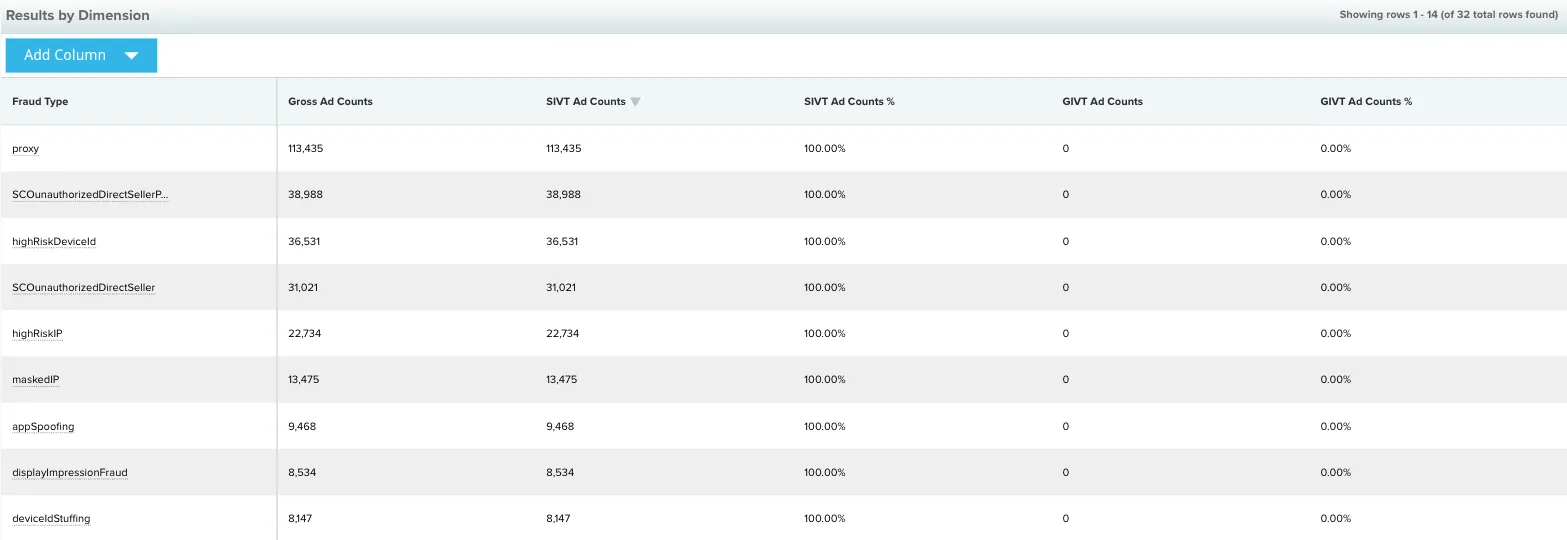
- Fraud Type dimension. Add it to a report to break your IVT down by type. In the Analytics Reports API and in exports, it’s the
fraudTypedimension, and each type is a short camelCase value such asmaskedIp. The By Fraud Type report in the dashboard shows these short values too. - Pre-set reports. The By Fraud Type and Invalid Traffic reports break your traffic down by IVT type, grouped as GIVT and SIVT. See Pre-set reports.
Each row with a fraud type value is 100% IVT, and a row with no fraud type value is IVT-free. Fraud types are calculated based on the worst fraudulent activity that each IP has performed globally. This means a report can show click fraud types even if you haven’t implemented Pixalate click trackers.
For the metrics that count filtered traffic, such as GIVT Ad Counts and SIVT %, see Metrics: IVT.
Reported types and IVT Taxonomy 2.0
The type names used in Analytics reports predate IVT Taxonomy 2.0, and many of them differ from the taxonomy’s names. The table maps each reported name to the taxonomy type that describes the same activity. For each type’s full definition, use the code to look it up in the IVT Taxonomy.
GIVT is General Invalid Traffic and SIVT is Sophisticated Invalid Traffic. The API value is shown where Pixalate has published it.
Types without a published taxonomy match
These reported types have no single matching type in IVT Taxonomy 2.0 that Pixalate has published. If you need to reconcile them with taxonomy codes, contact support@pixalate.com.
High risk apps
Impressions from apps on the High Risk Mobile Apps 2.0 and High Risk CTV Apps 2.0 lists are no longer classified under the High Risk App IVT type. This separates app-level structural risk from impression-level IVT detection, in line with the MRC’s Invalid Traffic Detection and Filtration Interim Update Memo.
To see how much of your traffic comes from listed apps, use the Traffic from High Risk Apps (%) metric and the High Risk App (Yes/No) dimension. For when this changed, see the changelog.
Defased apps
Defased App is SIVT. It’s in the Known Dangerous Sources category of IVT Taxonomy 2.0. Not every delisted app is flagged: Pixalate looks at how an app behaved before it was delisted when deciding whether its traffic is IVT, and traffic from a delisted app can be labeled with other IVT types first. For the delisted app lists you can block pre-bid, see Delisted apps (DEFASE).
How to address each type
For how often Pixalate’s crawler refreshes ads.txt, app-ads.txt and sellers.json data, see the Analytics FAQ.
Related
Questions? Contact support@pixalate.com.