Find MFA sites and apps in the MRT
The Media Ratings Terminal (MRT) shows Pixalate’s MFA risk rating (low, medium or high) in two places: Discovery, where you can filter many sites, and mobile apps, by MFA risk, and Insights, where you can see why one site got its rating.
Video (1.5 min): find MFA sites in Discovery and read one site’s MFA risk.
Before you start
- You need an MRT subscription that includes domains. If you don’t see the MFA filter or card, ask your Pixalate account manager about access.
- It helps to know what the ratings mean. See MFA methodology and definitions.
The MFA signals in the MRT
For websites, the MRT covers four data points from Pixalate’s MFA methodology:
The MRT also shows other ad quality information for each website, which you can weigh alongside MFA risk.
Find MFA websites in Discovery
- Open Discovery and choose Domains.
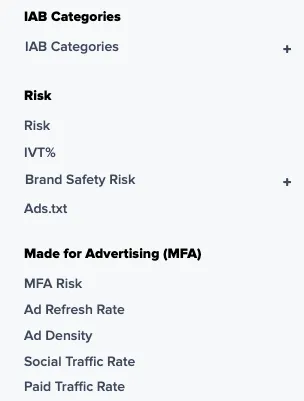
- In the left sidebar, open the Made for Advertising (MFA) group and use the MFA Risk filter to pick a risk level, for example High. The filter takes one level at a time. The same group has filters for Ad Refresh Rate, Ad Density, Social Traffic Rate and Paid Traffic Rate, and an Include Subdomains toggle.
- Read the MFA Risk column in the results grid. Sort or combine it with other filters to narrow the list.
Pixalate recommends transacting only with properties rated low MFA risk, and treating both medium and high as disqualifying. For more on Discovery, see Discovery. To turn the results into a block list, see Build exclusion and inclusion lists.
Check one website in Insights
- Search for the domain and open its Insights page. See Read an Insights report.
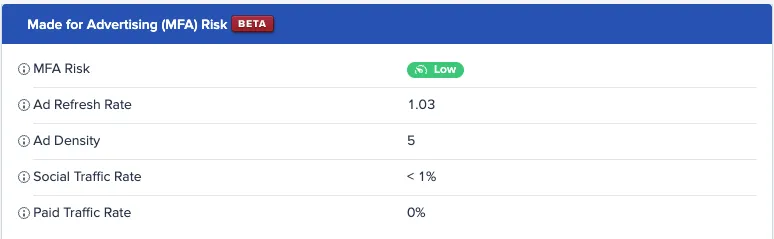
- In the Domain Details section, find the Made for Advertising (MFA) Risk card.
- Read the overall MFA risk, then the breakdown of the signals behind it: ad refresh rate, ad density, social traffic and paid traffic.
A high value on one signal tells you where the problem is. For example, a high paid traffic rate means much of the site’s traffic comes from paid ad sources, while a high ad refresh rate means many ad impressions per device each minute.
Mobile and CTV apps
For mobile and CTV apps, Pixalate’s MFA rating uses a different set of signals: ad refresh rate, app age, IVT rate, popularity score and number of reviews. Mobile app Discovery also has MFA Risk and Ad Refresh Rate filters. To get MFA risk for apps outside the MRT:
- Enrichment API: request the
mfawidget to get an app’s MFA risk and ad refresh rate. See the mobile app and CTV app fields. - MFA data feeds: daily lists of medium- and high-risk mobile and CTV apps. See MFA data feeds.
Related
Questions? Email support@pixalate.com.