Search
The search bar at the top of the Media Ratings Terminal (MRT) finds apps and domains by title, app ID, bundle ID or domain, and by keywords in an app’s content or privacy policy. Use it to jump to one property’s Insights report, or to build a list of matching properties and download it.
Search for an app or domain
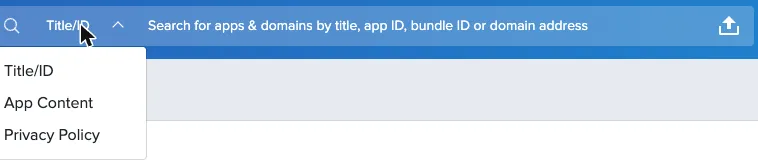
The drop-down at the left of the search bar sets what you search: Title/ID (app titles, app and bundle IDs, and domains), App Content or Privacy Policy.

Choose what to search
The drop-down at the left of the search box sets what your text is matched against. Title/ID is the default.
Enter your search
Type a title, an app or bundle ID (for example com.example.app), a keyword, or a domain. For domains, leave out www., http:// and https://.
Results are sorted by inventory volume, based on the impressions Pixalate observes. If an app you searched for by title isn’t on the first pages, search by its app or bundle ID instead, or download the results and look for it there.
Filter the results
The filter panel on the left narrows the list. Filters depend on the supply type and include:
- COPPA audience (child-directed or general audience)
- Privacy policy detected
- Developer name and developer country
- Store categories and subcategories, and IAB categories and subcategories
- App-ads.txt detected
- Ads detected
- Estimated daily and monthly reach
- App release date and the app’s last update date
- Delisted date
The Filters line above the results shows what’s applied. You can switch between grid and list views with the icons next to the download button.
Download the results
Select Download as JSON, or open the arrow next to it and select Download as CSV.
Upload a list
To check your own list of apps or sites, select the upload icon at the right of the search box and choose a CSV file. See Check many apps or domains at once for how to format the file and read the results.
Find apps that aren’t listed on Google Play or the App Store
The MRT also has data for mobile app and bundle IDs that aren’t listed on Google Play or the Apple App Store. These can be valid IDs from app stores the MRT doesn’t support, such as the Xiaomi or Oppo stores, or spoofed bundle IDs.
These IDs have no app store metadata or title in the MRT, so you can find them only by searching the exact app or bundle ID. Searching by title or keyword won’t return them. In the results they’re marked Not Listed, with the app store shown as Unknown and the category as Not Applicable. Their Insights reports show a reduced set of sections; see Bundle IDs that aren’t listed on an app store.
Related
- Discovery: filter the whole MRT index rather than search results.
- Glossary: what each metric means.
- Enrichment API: look up the same data from code.
Questions? Email support@pixalate.com.