iCloud Private Relay
iCloud Private Relay (iCPR) is an Apple privacy feature, part of an iCloud+ subscription, that hides the user’s IP address when they browse the web in Safari. Requests go through two separate relays, so that no single party, not even Apple, can see both who the user is and which sites they visit. See Apple’s About iCloud Private Relay.
Apple also offers a free option in Safari that hides the user’s IP address from known trackers only. It uses the same iCloud Private Relay infrastructure and IP ranges.
Why it matters
Pixalate’s research on iCPR traffic found a potential exploit and suspicious behavior in the traffic: see the first study and the November 2022 follow-up on the “iP64” exploit.
Analytics gives you two tools for iCPR traffic: an IVT type for invalid iCPR traffic and a pre-set report for all of it.
The Masked iCloud Relay IP IVT type
Masked iCloud Relay IP (maskediCloudRelayIP) is a SIVT type. It flags traffic whose declared IP is in the iCloud Private Relay range and that shows suspicious behavior, such as:
- traffic from an invalid data center IP range
- traffic with inappropriate device types
- traffic with suspicious patterns and associations
In IVT Taxonomy 2.0 it corresponds to Spoofed iCloud Private Relay (2204). See Reported IVT types.
Effect on your IVT rates
Masked iCloud Relay IP is carved out of the Masked IP type. It doesn’t increase your total IVT rate. Instead, the traffic it flags moves out of Masked IP, so your Masked IP rate goes down accordingly.
Only the part of iCPR mismatch traffic that shows suspicious behavior is flagged as Masked iCloud Relay IP.
The iCPR Traffic report
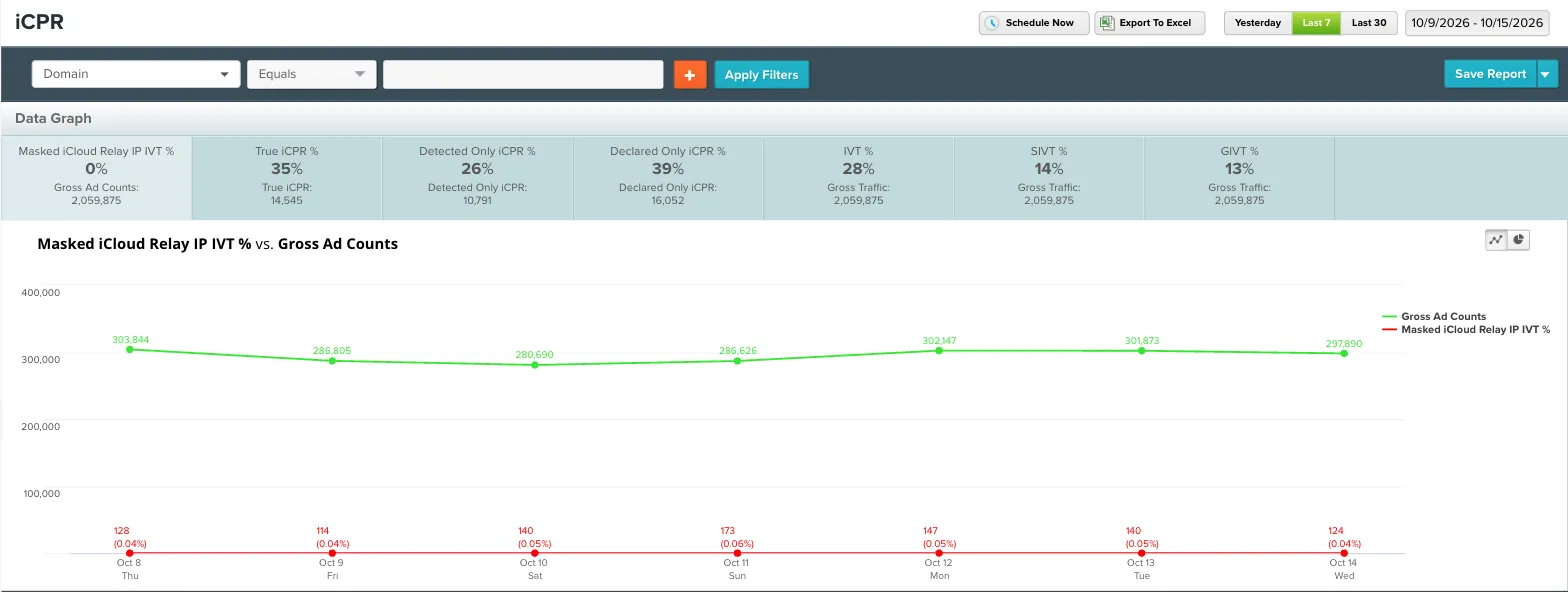
The iCPR Traffic Report is a pre-set report in the Analytics dashboard. It takes all your iOS and macOS Safari traffic and shows your valid and invalid iCloud Private Relay traffic in one place. You can break it down by domain, seller, iCPR type and more. See Pre-set reports.
iCPR Type values
The iCPR Type dimension shows how iCloud Private Relay IP addresses appeared in your traffic.
Related
Questions? Contact support@pixalate.com.