Know Your Developer (KYD)
A free, public database that rates ad-funded mobile app developers on child safety, privacy compliance and ad fraud risk.
The Know Your Developer (KYD) database is a free watchdog platform that rates the Google Play and Apple App Store developers who monetize mobile apps through advertising. It helps parents, schools and child safety advocates find privacy and safety risks that the app stores don’t disclose. KYD covers more than 350,000 developers.
In the MRT, open KYD from Rankings > Know Your Developer Safety Database.
Ratings are based on how accessible a developer’s identity is, compliance with privacy laws, app store compliance and traffic quality risk. Two sources feed the database:
- Pixalate’s Trust & Safety Advisory Board, made up of teachers, parents and lawyers, manually reviews mobile apps to determine their intended audience and check key privacy compliance features such as age gates and Verifiable Parental Consent (VPC).
- Advertising data monitored by Pixalate’s MRC-accredited ad fraud detection technology.
KYD is free on the Know Your Developer page on pixalate.com. It’s updated monthly, and you can search and filter by developer or app name, the developer’s country of registry and app store presence.
How developers are rated
KYD rates every mobile app developer that has an app-ads.txt file, as measured by Pixalate. There are nine risk metrics in three risk categories:
The category ratings combine into an overall Child Safety Risk rating.
Risk metric definitions
Identity Risk
Missing Contact Info Risk
Whether the developer’s contact email or physical address can be found on its app store pages or website, as measured by Pixalate.
- Low Risk: a contact email or physical address is found for the developer.
- Critical Risk: no contact email or physical address is found for the developer.
Anonymous Owner Risk
Whether the developer’s website is registered anonymously in the internet WHOIS domain databases.
- Low Risk: the developer’s website is registered publicly.
- High Risk: the developer’s website is registered anonymously.
Compliance Risk
Verifiable Parental Consent Not Detected Risk
Whether the developer has any likely child-directed apps that don’t obtain Verifiable Parental Consent (VPC) before collecting and sharing personal information such as IP address or user location, as measured by Pixalate. Pixalate’s Trust & Safety Advisory Board manually downloads, tests and reviews apps to decide whether an app is likely child-directed and whether it has sufficient VPC in place.
- Low Risk: the developer has no manually reviewed apps that violate the VPC requirements of COPPA.
- Critical Risk: the developer has at least one app that was manually determined to be likely child-directed and that transmits personal user information (IP, location) without obtaining VPC.
Missing Privacy Policy Risk
Whether the developer has a publicly accessible privacy policy linked from its app store pages.
- Low Risk: a privacy policy is detected for the developer.
- Critical Risk: no privacy policy is detected for the developer.
COPPA Violation Risk
Whether the developer is at risk of violating the Children’s Online Privacy Protection Act (COPPA) by violating its Verifiable Parental Consent (VPC) requirements.
- Low Risk: the developer has no apps likely violating VPC requirements.
- Critical Risk: the developer has likely child-directed apps that transmit user information (IP, location) without VPC.
Location Tracking Risk
Whether the developer operates apps that request precise geolocation access permissions or transmit user location in the advertising bid stream, as measured by Pixalate.
- Low Risk: the developer has no apps that request access to users’ geolocation data through certain app permissions.
- Medium Risk: the developer has one or more apps that request access to geolocation data through certain app permissions, but precise geolocation data isn’t transmitted in the advertising bid stream.
- Critical Risk: the developer has one or more apps that request access to geolocation data through certain app permissions, and precise geolocation data is transmitted in the advertising bid stream.
Banned Apps Risk
How many of the developer’s apps, and how much of its install base, have been removed or delisted from Google Play or the Apple App Store, and whether the developer monetizes those apps through advertising.
- Low Risk: the developer has no apps delisted or banned from Google Play or the Apple App Store.
- Medium Risk: the developer has some delisted or banned apps, but they make up a small part of the developer’s lifetime install base.
- High Risk: the developer has many delisted or banned apps, and they make up a large part of the developer’s lifetime install base.
- Critical Risk: either of these applies:
- The developer has many or all apps delisted or banned, and they make up a significant part of the developer’s lifetime install base.
- The developer monetizes delisted or banned apps, according to advertising traffic measured by Pixalate.
Security Risk
Whether the developer operates apps on Google Play or the Apple App Store that haven’t been updated in three or more years, measured against app store compliance and security guidelines.
- Low Risk: the developer has no apps that haven’t been updated in 3+ years.
- High Risk: the developer has at least one app that hasn’t been updated in 3+ years.
- Critical Risk: the developer has many or all apps that haven’t been updated in 3+ years, or these abandoned apps make up a significant part of the developer’s lifetime install base, or both.
Traffic Quality Risk
Unsafe Advertising Risk
The rate of impressions measured on the developer’s apps that are designated as invalid traffic (IVT). It combines sophisticated invalid traffic (SIVT) and general invalid traffic (GIVT) measurements. See IVT Taxonomy 2.0.
Pixalate assigns Low, Medium, High and Critical Risk using statistical analysis and clustering methods that derive dynamic risk thresholds for SIVT and GIVT rates at a global scale.
Overall Child Safety Risk
Each risk category takes the level of its highest risk metric. For example, Compliance Risk is Critical if Missing Privacy Policy Risk is Critical, even if Banned Apps Risk, Security Risk and the other compliance metrics are Low.
The one exception is Anonymous Owner Risk: it can raise Identity Risk to Medium at most, even when it’s flagged High.
The three category levels then set the developer’s overall Child Safety Risk rating:
For the full methodology, see the KYD methodology download on pixalate.com.
Get a developer’s app list
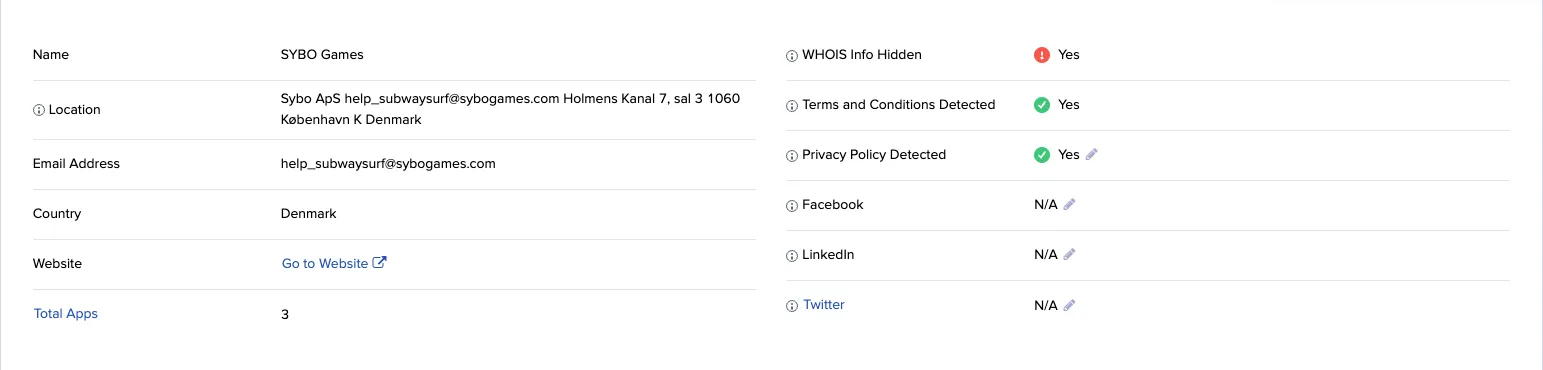
Developers often publish several apps and share code between them. If one app is flagged as suspect or high risk, the developer’s other apps may behave the same way, so review all of that developer’s apps before you keep any of them on your media plan. In the Media Ratings Terminal (MRT) you can list them in two ways.
A developer’s app list shows apps from one store at a time: either the Apple App Store or Google Play. The same developer can have a different name and email in each store.
From an app’s Insights report
From Discovery
Choose the app store
At the top of the Discovery report, select the store you want: Apple App Store or Google Play. Searching for an Apple developer while Google Play is selected returns no results.
Filter by developer
In the Developer filter, search for the developer’s name or email and select it from the list.
Review the apps
The report lists the developer’s apps in that store. To act on the list, select Download as CSV and add the apps to your exclusion list. See Build exclusion and inclusion lists.
For CTV apps, Discovery shows the developer’s name, website and Developer Total Apps (the number of apps the developer has published across Pixalate’s CTV index). See Discovery.
Disclaimer
Pixalate’s Mobile Application Know Your Developer Ratings (“KYD”) reflect Pixalate’s opinions that Pixalate believes may be useful to parents, guardians, educators, regulators, researchers, and participants in the digital media industry. Any data shared is grounded in Pixalate’s proprietary technology and analytics, which Pixalate is continuously evaluating and updating. Any references to outside sources should not be construed as endorsements, affiliations, or associations with any third-parties. Pixalate is sharing this data not to impugn the standing or reputation of any entity, person or app, but, instead, to report research findings and trends pertaining to the time period studied.
It is important to note however, that classification of a mobile application developer (“app developer”) within a particular risk tier does not mean that the app developer, its applications, or any associated practices are in violation of any laws or regulations, including the Children’s Online Privacy Protection Act (COPPA) or any other global privacy framework. Further, the app(s) of an app developer(s) that appear(s) to be directed to children (e.g., users under 13 years of age, as defined by the COPPA Rule) does not mean that any such app, or its operator, is failing to comply with the COPPA Rule.
Pixalate’s determinations are based on a proprietary methodology that incorporates a combination of signals and automated processes. Additionally, with respect to app developers that appear to have characteristics that, in Pixalate’s opinion, may trigger related privacy law or regulatory compliance obligations and/or risk, such assertions reflect Pixalate’s opinions i.e., they are neither facts nor guarantees. While Pixalate endeavours to apply rigorous standards in compiling this KYD, no assurances or guarantees can be, or are, made as to the accuracy or completeness of any classification. This article/expose, including all content set forth herein–constitutes Pixalate “Materials” under Pixalate’s Terms of Use, and is licensed subject to–and conditioned expressly upon–compliance with each of the applicable terms and conditions of such Pixalate Terms of Use.
Per the MRC, “‘Fraud’ is not intended to represent fraud as defined in various laws, statutes and ordinances or as conventionally used in U.S. Court or other legal proceedings, but rather a custom definition strictly for advertising measurement purposes.” Also per the MRC, “‘Invalid Traffic’ is defined generally as traffic that does not meet certain ad serving quality or completeness criteria, or otherwise does not represent legitimate ad traffic that should be included in measurement counts. Among the reasons why ad traffic may be deemed invalid is it is a result of non-human traffic (spiders, bots, etc.), or activity designed to produce fraudulent traffic.”
Apple and the Apple logo are trademarks of Apple Inc; Google, Google Ad Exchange, the brand “Google Play,” its logos, and other Google logos are trademarks of Google LLC. These companies are not affiliated with, nor do they endorse or sponsor, any products, data, content, reports, materials or services associated with Pixalate. Any other brand logos, names, or trademarks not explicitly mentioned herein – but otherwise mentioned, displayed, or used in any of Pixalate’s materials, including this report – are the property of their respective owners.